Free TradingView indicator
Dynamic Range Tool
The session range, its quarters, and the projections price is running into.
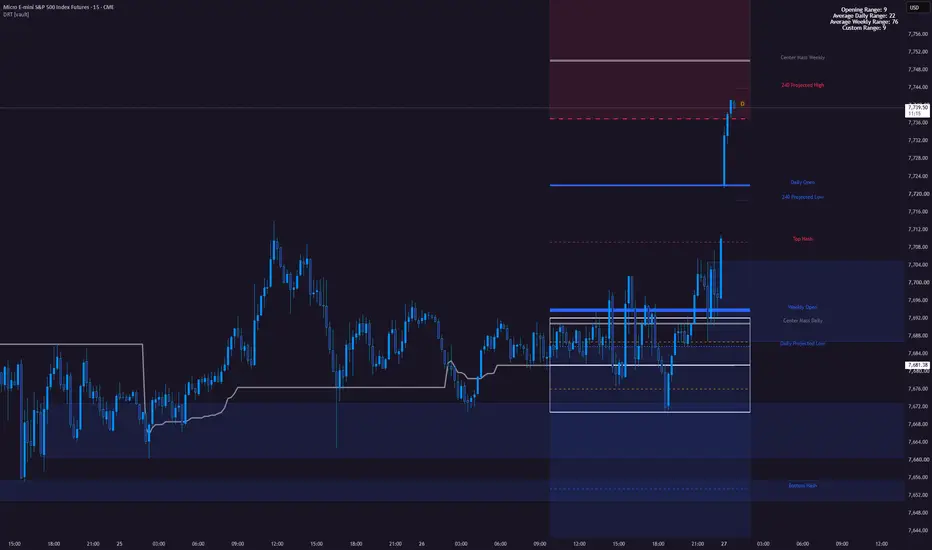
What Dynamic Range Tool does
Boxes the window you actually trade — Asia into the London open by default — then keeps drawing forward from it: the midpoint, the quarters, and the extensions price reaches before the day has used its average range.
What it draws on the chart
- Range high, low, midpoint and quarters for your own time window
- Projections at 1x through 2.5x, and what is left of the average daily range
- Daily and weekly opens, coloured by which side price is on
- A stats panel in pips or ticks, plus alerts on every level
How to get it
Dynamic Range Tool is free. Open its TradingView page, add it to your favourites and it appears in the indicator list on any chart. No Payout Vault account is needed to use it.
The concept behind it
What it is not
An indicator marks what has already happened on the chart. It does not tell you to buy or sell, and it does not replace a plan with its own entry, invalidation and risk rules.
Other indicators.
- CRT EngineCandle Range Theory on the chart: the higher timeframe range, and how it gets taken.
- VWAP SuiteVWAP as a developing value area across every session, not one line.
- Absorption BubblesMarks where aggressive orders into a high or low got absorbed.
- Volume Delta SuiteBuy and sell pressure split out of the bar, instead of one volume column.
- Kernel BandsA kernel regression centreline with bands sized by how far price normally strays from it.
- SMT AutopilotSMT divergence that picks its own comparison assets, so there is nothing to configure.
- Sweep EngineMarks swept liquidity that got rejected, and scores how much agrees with it.
- SMT Autopilot+The member build of SMT Autopilot: every divergence scored by the full eight-factor engine.
- HOB / PHOB / BBHidden order blocks, Bojan triple sweeps and unfinished candles from ten timeframes, on one chart.